miércoles, 19 de noviembre de 2008

Semana 23 por Joy


Primer articulo:

Skype anuncia plan de llamadas ilimitadas a 34 países


Skype ha presentado hoy un nuevo plan de llamadas internacionales a teléfonos fijos, que destaca por ser ilimitado, lo cual torna la oferta interesante.

Por solo 8.95€ (+ IVA) al mes, podremos realizar llamadas a un total de 34 países alrededor del mundo, donde podemos destacar la presencia de Chile, España, y la ausencia de Argentina, por ejemplo.

La idea de la empresa, es seguir con su objetivo de hacer que el mundo se pueda comunicar por voz y vídeo, de forma gratuita (o casi…), y con este paso van un poco más allá de lo que actualmente ofrecían (llamadas gratuitas entre usuarios Skype).


Segundo articulo:

Lexmark lanzó en el mercado local una impresora Wi-Fi color, que posee funciones fotográficas y ofrece resultados rápidos, nítidos y fiables.

Se trata del modelo Z1420 Wireless Color Printer, que permite a los usuarios trabajar desde cualquier lugar de su casa u oficina, entregando textos y fotos a velocidades de 24 páginas por minuto (ppm) en blanco y negro, y 18 ppm a color, con una calidad de impresión de hasta 4800 x 1200 ppp de resolución.

El equipo dispone de sencillas instrucciones paso-a-paso que facilitan su instalación a redes inalámbricas existentes, puede ser compartido por varias PCs, y su tamaño es reducido.Además, el dispositivo está diseñado para la impresión inalámbrica 802.11g., es apto para la conexión con redes inalámbricas de 802.11b y computadoras Wi-Fi, o con cable USB.


Tercer articulo:
PHOTOSHOP ONLINE, DIGO PHOTOSHOP EXPRESS
Adobe ha lanzado la versión online de Photoshop, de momento en fase beta en la que los usuarios disponen de 2 GB para almacenar las fotos que editen, también esta conectado a servicios como Facebook, Picassa o Photobucket.
En cuanto a las capacidades de edición se encuentran 17 funciones con la que podrás por ejemplo: rotar la imagen, eliminar ojos rojos, retocar la saturación, balance de blancos, enfoque, sombras así como otros efectos como distorsiones o paso a sepia, etc. y por si fuera poco si editas una imagen para alguno de los servicios con los que esta enlazado la guardara directamente en tu cuenta Facebook.

jueves, 13 de noviembre de 2008

miércoles, 5 de noviembre de 2008

miércoles, 22 de octubre de 2008

Ascensor por Joy


Codigo de ascensor:

Private Sub luz_Click()asensor.BackColor = vbRedEnd SubPrivate Sub pisocuatro_Click()asensor.Top = 840End SubPrivate Sub pisodos_Click()asensor.Top = 2280End SubPrivate Sub pisotres_Click()asensor.Top = 1560End SubPrivate Sub parar_Click()Private Sub pisouno_Click()asensor.Top = 3000End SubPrivate Sub plantabaja_Click()asensor.Top = 3720End SubPrivate Sub subsuelo_Click()asensor.Top = 4440End Sub

jueves, 25 de septiembre de 2008

calculadora por Joy


Captura de pantalla:


Codigo de calculadora:

Private Sub borrador_Click()
visor.Caption = " "
End Sub

Private Sub cinco_Click()
visor.Caption = visor.Caption + "5"
End Sub

Private Sub cuatro_Click()
visor.Caption = visor.Caption + "4"
End Sub

Private Sub dividido_Click()
auxiliaruno.Caption = visor.Caption
auxiliardos.Caption = "/"
visor.Caption = " "
End Sub

Private Sub dos_Click()
visor.Caption = visor.Caption + "2"
End Sub

Private Sub igual_Click()
If auxiliardos.Caption = "+" Then
visor.Caption = Val(auxiliaruno.Caption) + Val(visor.Caption)
auxiliaruno.Caption = ""
auxiliardos.Caption = ""
End If
If auxiliardos.Caption = "-" Then
visor.Caption = Val(auxiliaruno.Caption) - Val(visor.Caption)
auxiliaruno.Caption = ""
auxiliardos.Caption = ""
End If
If auxiliardos.Caption = "/" Then
visor.Caption = Val(auxiliaruno.Caption) / Val(visor.Caption)
auxiliaruno.Caption = ""
auxiliardos.Caption = ""
End If
If auxiliardos.Caption = "*" Then
visor.Caption = Val(auxiliaruno.Caption) * Val(visor.Caption)
auxiliaruno.Caption = ""
auxiliardos.Caption = ""
End If
End Sub


Private Sub mas_Click()
auxiliaruno.Caption = visor.Caption
auxiliardos.Caption = "+"
visor.Caption = " "
End Sub

Private Sub menos_Click()
auxiliaruno.Caption = visor.Caption
auxiliardos.Caption = "-"
visor.Caption = " "
End Sub

Private Sub multiplicar_Click()
auxiliaruno.Caption = visor.Caption
auxiliardos.Caption = "*"
visor.Caption = " "
End Sub

Private Sub nueve_Click()
visor.Caption = visor.Caption + "9"
End Sub

Private Sub ocho_Click()
visor.Caption = visor.Caption + "8"
End Sub

Private Sub punto_Click()
visor.Caption = visor.Caption + "."
End Sub

Private Sub seis_Click()
visor.Caption = visor.Caption + "6"
End Sub

Private Sub siete_Click()
visor.Caption = visor.Caption + "7"
End Sub

Private Sub tres_Click()
visor.Caption = visor.Caption + "3"
End Sub

Private Sub uno_Click()
visor.Caption = visor.Caption + "1"
End Sub

Private Sub zero_Click()
visor.Caption = visor.Caption + "0"
End Sub

viernes, 19 de septiembre de 2008

Semana 22

Primer noticia:

Google Insights: una herramienta para conocer actitudes e intereses de los internautas
Enviado el 18 Septiembre 2008 en Tendencias por Grupo Novos Medios
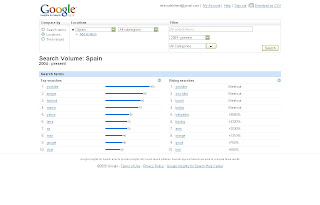
La herramienta Google Insights, lanzada en el mes de agosto, nace para ayudar a anunciantes y marketers a conocer el comportamiento de los usuarios de la red. Google Insights nos permite conocer cuáles han sido las principales búsquedas de los internautas atendiendo a una serie de criterios como distribución geográfica, temporal o categoría.

Sin duda Google Insights se puede convertir en una interesante herramienta para la investigación relacionada con la comunicación online, no podemos olvidar que Google es el motor de búsqueda preferido por los usuarios de Internet. Es interesante observar cómo las preferencias de búsqueda varían en función de las noticias o los acontecimientos más destacados de cada jornada.

Como anécdota destacar que el principal término de búsqueda de los españoles desde el año 2004 a la actualidad ha sido el del portal Youtube. Teniendo en cuenta que el portal no es lanzado hasta el año 2005 podemos apreciar la importancia que ha adquirido la distribución de video por Internet en los últimos años.

jueves, 18 de septiembre de 2008

Codigo de contro 2

Codigo de control 2 (Yaz, Joy y Bren)

Private Sub Command7_Click()
End Sub
Private Sub anterior_Click()
End Sub
Private Sub brillomas_Click()tv.Left = tv.Left + 100auxiliar.Left = auxiliar.Left + 100base.Left = base.Left + 100nrocanal.Left = nrocanal.Left + 100onoff.Left = onoff.Left + 100tvcatv.Left = tvcatv.Left + 100End Sub
Private Sub cero_Click()auxiliar.Caption = auxiliar.Caption + "0"End Sub
Private Sub cinco_Click()auxiliar.Caption = auxiliar.Caption + "5"End Sub
Private Sub Command1_Click()
End Sub
Private Sub cuatro_Click()auxiliar.Caption = auxiliar.Caption + "4"End Sub
Private Sub dos_Click()auxiliar.Caption = auxiliar.Caption + "2"End Sub
Private Sub Label2_Click()
End Sub
Private Sub enter_Click()nrocanal.Caption = auxiliarauxiliar.Caption = ""End Sub
Private Sub form2_Click()tvcatv.Caption = tvcatvtvcatv = "tv"End Sub
Private Sub mascanal_Click()If nrocanal.Caption > 12 Then If tvcatv.Caption = "tv" Then nrocanal.Caption = 1Else nrocanal.Caption = 1End IfElse nrocanal.Caption = nrocanal.Caption + 1End IfEnd Sub
Private Sub massonido_Click()
End Sub
Private Sub masvolumen_Click()tv.Top = tv.Top + 100auxiliar.Top = auxiliar.Top + 100base.Top = base.Top + 100nrocanal.Top = nrocanal.Top + 100tvcatv.Top = tvcatv.Top + 100onoff.Top = onoff.Top + 100
End Sub
Private Sub menosbrillo_Click()tv.Left = tv.Left - 100auxiliar.Left = auxiliar.Left - 100base.Left = base.Left - 100nrocanal.Left = nrocanal.Left - 100onoff.Left = onoff.Left - 100tvcatv.Left = tvcatv.Left - 100
End Sub
Private Sub menoscanal_Click()If nrocanal.Caption < 1 Then If tvcatv.Caption = "tv" Then nrocanal.Caption = 13Else nrocanal.Caption = 130End IfElse nrocanal.Caption = nrocanal.Caption - 1End IfEnd Sub
Private Sub menosvolumen_Click()tv.Top = tv.Top - 100auxiliar.Top = auxiliar.Top - 100base.Top = base.Top - 100nrocanal.Top = nrocanal.Top - 100tvcatv.Top = tvcatv.Top - 100onoff.Top = onoff.Top - 100
End Sub
Private Sub nueve_Click()auxiliar.Caption = auxiliar.Caption + "9"End Sub
Private Sub ocho_Click()auxiliar.Caption = auxiliar.Caption + "8"End Sub
Private Sub off_Click()nrocanal.Caption = ""tvcatv.Caption = ""onoff.BackColor = vbBlackuno.Enabled = Falsedos.Enabled = Falsetres.Enabled = Falsecuatro.Enabled = Falsecinco.Enabled = Falseseis.Enabled = Falsesiete.Enabled = Falseocho.Enabled = Falsenueve.Enabled = Falsecero.Enabled = False
End Sub
Private Sub offon_Click()If uno.Enabled = True Then nrocanal.Caption = "" tvcatv.Caption = "" onoff.BackColor = vbBlack uno.Enabled = False dos.Enabled = False tres.Enabled = False cuatro.Enabled = False cinco.Enabled = False seis.Enabled = False siete.Enabled = False ocho.Enabled = False nueve.Enabled = False cero.Enabled = False enter.Enabled = False masvolumen.Enabled = False menosvolumen.Enabled = False brillomas.Enabled = False menosbrillo.Enabled = False mascanal.Enabled = False menoscanal.Enabled = False form2.Enabled = False tvctv1.Enabled = False Else nrocanal.Caption = "0" tvcatv.Caption = "tv" onoff.BackColor = vbRed uno.Enabled = True dos.Enabled = True tres.Enabled = True cuatro.Enabled = True cinco.Enabled = True seis.Enabled = True siete.Enabled = True ocho.Enabled = True nueve.Enabled = True cero.Enabled = True enter.Enabled = True masvolumen.Enabled = True menosvolumen.Enabled = True brillomas.Enabled = True menosbrillo.Enabled = True mascanal.Enabled = True menoscanal.Enabled = True form2.Enabled = True tvctv1.Enabled = True End If

End Sub
Private Sub on_Click()nrocanal.Caption = "0"tvcatv.Caption = "tv"onoff.BackColor = vbReduno.Enabled = Truedos.Enabled = Truetres.Enabled = Truecuatro.Enabled = Truecinco.Enabled = Trueseis.Enabled = Truesiete.Enabled = Trueocho.Enabled = Truenueve.Enabled = Truecero.Enabled = TrueEnd Sub
Private Sub seis_Click()auxiliar.Caption = auxiliar.Caption + "6"End Sub
Private Sub siete_Click()auxiliar.Caption = auxiliar.Caption + "7"End Sub
Private Sub tres_Click()auxiliar.Caption = auxiliar.Caption + "3"End Sub
Private Sub tv1_Click(Index As Integer)tvcatv.Caption = tvcatvtvcatv = "tv"End Sub
Private Sub tvcatv2_Click()If tvcatv.Caption = form2.Caption Then tvcatv.Caption = tvctv1.CaptionElse tvcatv.Caption = form2.Caption
End IfEnd Sub
Private Sub tvctv1_Click()tvcatv.Caption = tvcatvtvcatv = "tvcatv"End Sub
Private Sub uno_Click()auxiliar.Caption = auxiliar.Caption + "1"End Sub